AI UGC Video Generator

Model

Creator photo

Product photos

0 / 8,800

Duration
Aspect ratio

AI UGC Video Generator

Turn a creator photo, product images and a short script into a UGC-style video. Choose a model and direct the spoken line and product demonstration.

AI UGC Video Generator

Creator and product examples

Watch the product handling, then load the matching photos and adapt the suggested prompt.

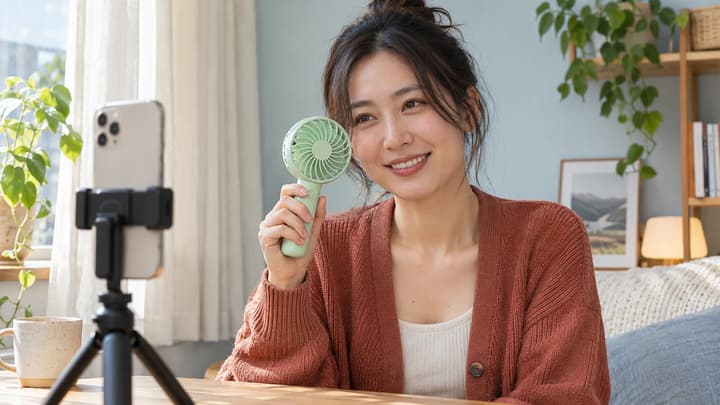
A fan at the café

Keep the face and fan visible as the creator picks it up.

Load this example
Suggested prompt

Use the creator photo for identity and the product photo for the peach fan and its dock. At a sunny outdoor café, the creator picks up the fan, turns it on and holds it beside her face. She says, “This little fan is coming with me.” Let her hair move gently in the airflow. Keep the fan shape, button and color consistent. Natural English delivery, café ambience and a quiet motor sound. Vertical phone-camera framing.
Shot reference

Show a product with a creator

Keep a person and a product in the same short scene. Supply their photos, then direct the speech and movement.

References

Give the creator and product separate roles

Use one clear portrait for the person. Add matching views of the same product within the selected model’s image limit.

Direction

Pair a short line with one action

Write the words to speak in quotes. Describe a simple hold, turn or opening movement with enough time to finish.

Review

Check the product throughout the shot

Watch the face, fingers and product details during movement. Revise the references or direction from the result.

Create a UGC product clip

01

Add the person and product

Choose a model, upload one creator photo and add product views of the same variant.

02

Write the line and action

Quote the dialogue and describe what the hands and camera should do. Choose a supported duration and frame.

03

Generate and review

Check the credit quote, generate, then watch the complete clip. Re-edit the inputs or continue in the video editor.

AI UGC video questions

What does the AI UGC video generator create?

One short creator-led product video from a person photo, product photos and a script. The selected model determines its duration, image limit and output settings.

How many product photos can I add?

The limit follows the selected model, with one image slot reserved for the creator. Use consistent views of one product. Switching models updates the available slots.

How do I add speech?

Put the words to speak in quotes and describe the language or delivery. Speech is generated with the video, so check the wording and mouth movement in the result. Use Talking Avatar when you already have a voice recording.

Can I make several versions of an AI UGC ad?

Keep the same photos and change the opening line, gesture or setting in a new generation. Each submission uses the displayed credits. Review each version before publishing.

Does loading an example spend credits?

No. Loading and editing an example is free. Credits are charged only when you generate a video, at the price shown on the Generate button.
