Script to Video AI

Model

Reference images

0 / 8,600

Duration
Aspect ratio

Script to Video AI

Turn a short scene script into one AI video. Describe the action and shot order, add reference images if needed, and choose a model, length and frame.

Short scripts in motion

Explore these scenes, then load a suggested script and adapt it to your subject. Loading does not start generation.

A room from a blueprint

A clear starting state changes into a furnished room.

Load this script
Scene script

In an empty industrial loft, glowing lines rise from a blueprint on the floor. They form a desk, chair and tall shelves, then settle into a furnished workspace. Fixed wide view; keep the room geometry. No text or dialogue.
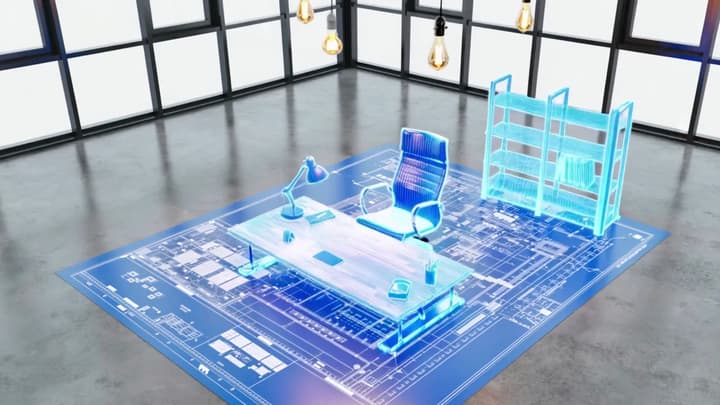
Video example

Give a short script something to show

A scene script describes visible changes: who acts, what happens next and where the camera ends. Each generation returns one short video within the chosen model’s limits.

Performance

Direct a visible reaction

Describe the gaze, expression and movement that carry a quiet emotional beat.

Time

Show a change over time

State what should move and what should stay fixed, as in a clock against a still wall.

Camera

Reveal the next detail

Move from one subject to another with an intentional camera direction.

Continuity

Keep a subject through the reveal

Name the subject and appearance to retain while the camera opens onto a wider setting.

From scene script to short video

01

Write what happens

Describe the subject, setting and visible action. Number a few shots when the order matters; keep dialogue separate from camera directions.

02

Choose references and settings

Add reference images within the selected model’s limit and explain each role. Choose a supported duration and frame, then check the credit quote.

03

Watch and revise

Check the complete action, subject continuity, cuts and ending. Re-edit the script or references, or continue with video editing and extension.

Script to video questions

Can I start with only a script?

Yes. A scene script is required; images are optional. Describe a visible action and ending rather than pasting a long article or a list of abstract benefits.

Can one video contain several shots?

You can request a few ordered shots within the selected duration. Exact cuts and timing depend on the model and result; they are not separate editable timeline clips.

Will it read my script aloud?

Scene directions are not read aloud by default. You may request dialogue or sound in the script, but this is generative audio, not a separate narration service or a guarantee of exact words.

Does it make long videos and subtitles?

This workflow returns one model-length video. Long scripts, independent voiceover tracks, subtitle files and automatic multi-clip assembly require a separate production workflow.

What do reference images control?

Identify which image guides a character, object, location or style. They are visual references, not automatically ordered storyboard panels or fixed opening and closing frames.

Does loading an example use credits?

No. It fills an editable script and settings, plus the original reference image where provided. Generation starts only after you submit and accept the displayed quote.