How to Make AI UGC Videos

Prepare the person, product and spoken line for one short scene. Use the result to decide which reference or direction needs another pass.

LumiYing TeamUpdated

Choose something the viewer can see

Start with a product feature that a person can demonstrate in one shot. A lid turning, a pocket opening or a case catching the light gives the creator a reason to handle the item. Write a line about that visible detail.

The person’s face, spoken line and hand movement all need time on screen. Keep the first version to one interaction. Speak the line aloud while performing the gesture to find a comfortable pace.

Prepare and generate the clip

  1. Step 01 Choose a clear creator portrait

    Use one person with a visible face and even light. Pick a view close to the planned camera angle. A chest-up photo helps define clothing and leaves the hands room to enter the shot.

  2. Step 02 Select matching product views

    Start with a whole-product photo. Add useful side or detail views of the same color and variant. Remove conflicting versions. The creator uses one reference slot, and the model sets the remaining product-photo limit.

  3. Step 03 Budget the words and movement

    Put the spoken line in quotes. Describe the action separately, including which hand supports the item and where it ends. If the product covers the mouth, place speech before or after that movement. Read the line aloud and leave time for the gesture and a final hold.

  4. Step 04 Choose settings and generate

    Open the AI UGC Video Generator, add the two types of photos and paste your script. Use 9:16 for a portrait shot, or choose another supported frame. Pick enough duration for the full line, review the displayed credit quote and generate.

  5. Step 05 Review contact points and speech

    Play the whole result with sound. Pause when fingers grip, twist or release the item. Compare the face, product shape, openings and colors with the references. Listen for changed or unfinished words. Re-edit the affected input before keeping the clip.

Plan the product interaction

Match the framing to the action

Hold beside the face
Keep the complete product below eye level.
The face stays visible and the item keeps its scale.
Open or turn a part
Name the supporting hand and use a steady camera.
Fingers stay attached and the mechanism follows its shape.
Show a small detail
Bring the item closer, then pause before speaking.
The detail stays sharp and the mouth is visible for dialogue.

Three product interactions

Watch the product handling, then load the matching photos and adapt the suggested prompt.

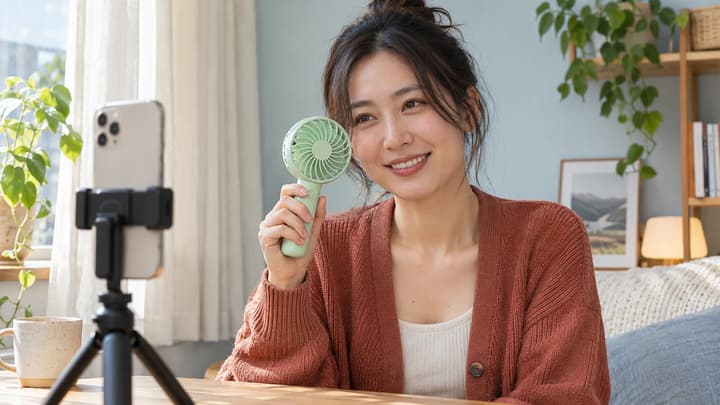
A fan at the café

Keep the face and fan visible as the creator picks it up.

Load this example
Suggested prompt

Use the creator photo for identity and the product photo for the peach fan and its dock. At a sunny outdoor café, the creator picks up the fan, turns it on and holds it beside her face. She says, “This little fan is coming with me.” Let her hair move gently in the airflow. Keep the fan shape, button and color consistent. Natural English delivery, café ambience and a quiet motor sound. Vertical phone-camera framing.

Shot reference

Revise the part that failed

The product changes shape
Conflicting views or too much movement
Use one variant and a smaller turn or hold.
Speech ends halfway through
Too many words for the selected duration
Shorten the line or choose a longer supported duration.
Hands merge with the item
A hidden grip or several actions at once
Show the contact point and ask for one movement.
The creator changes appearance
An unclear portrait or large angle changes
Use a clearer face and keep the camera closer to the reference angle.

Script and output questions

How long should an AI UGC script be?

Use a line you can say comfortably inside the chosen duration, with time left for handling the product. Read it aloud with the action. Shorten it if the gesture or ending feels rushed.

Can I reuse the same creator across clips?

Use the same portrait, clothing directions and framing for each generation. Compare identity across the finished clips because the model generates each take independently.

How should I compare ad variations?

Keep the photos, duration and frame fixed while changing one line or gesture. Check that each version shows the same product and finishes its message before comparing performance.

Generate your creator-led product clip
